 GeoCalendar
The short version
Choose Cal.com if
- Most of your bookings are video or phone calls.
- You want a free plan for one person, or payment at booking.
- You need routing forms, text-message reminders or one of its many integrations.
Choose GeoCalendar if
- Customers book visits at their own address, several a day.
- Your area is wide enough that where a visit falls in the day matters.
- You want each drive blocked on your calendar without working it out yourself.
The difference in one sentence
Both give your customers a link to pick a time. Cal.com chooses the times to offer from when you are free, with a fixed gap around each booking if you set one. GeoCalendar chooses them from when you are free and where you will be.
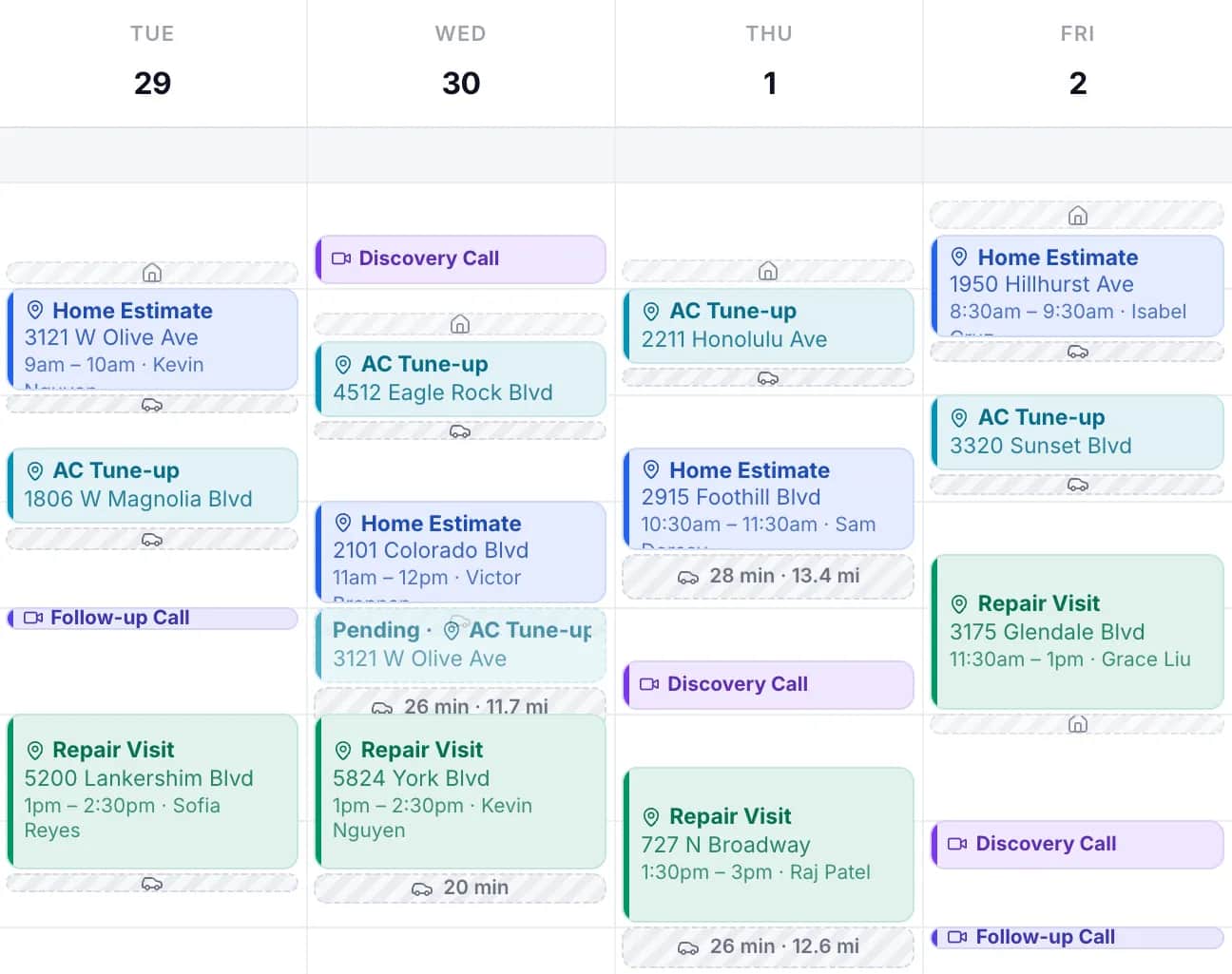
For a week of calls that difference is worth nothing, and Cal.com is the broader product. For a week of visits it decides how much of each day goes to driving.
Feature by feature
| Cal.com | GeoCalendar | |
|---|---|---|
| Booking link and website embed | Yes | Yes |
| Calendar sync | Google, Outlook, Apple Calendar and CalDAV | Google and Outlook |
| Video links | Zoom, Google Meet, Microsoft Teams and its own Cal Video | Zoom and Google Meet |
| Customer enters their address | Yes, as an attendee-address location | Yes, and the times offered depend on it |
| Travel time between bookings | A fixed buffer before or after, up to 120 minutes | Estimated for each leg from the two addresses |
| Times offered by location | Nothing in its help center describes it | Open times ranked by the driving each would add |
| Team scheduling | Round robin and collective links, on Teams | Co-hosts and rotating pools, on the Team plan |
| Payments at booking | Stripe and PayPal, on the free plan too | No |
| Routing forms | Yes, on Teams | No |
| Text-message reminders | Yes, through workflows, paid for with credits | No. Reminders go by email |
| Free plan | Yes, for one user | No. A 14-day trial of the Team plan, no card |
| Paid plans from | $12 per user a month, billed annually | $15 a month, billed annually |
Where Cal.com is the better tool
Cal.com does more, and charges less for it. One person can use it free, with payments through Stripe or PayPal included. Its Teams plan adds round robin, collective links and routing forms at $12 a seat, where our Team plan is $24 a seat. Workflows send reminders by email, text message or WhatsApp. Its app store lists more than a hundred integrations, and it has video calling of its own.
It also publishes an open-source community edition for people who want to host their own scheduling. GeoCalendar has none of these. If your bookings are calls, or your visits are few and close together, the things GeoCalendar adds are things you would not use.
Where GeoCalendar is the better tool
Cal.com handles travel with a buffer: time kept free before or after each booking of an event type, up to 120 minutes, whatever the two addresses are. Its help center lists travel among the things a buffer after a meeting is for. A buffer long enough for the worst drive wastes time on every short one, and a buffer sized for the short ones makes you late for the long ones. The help center explains why GeoCalendar keeps the two apart: Buffers before and after a visit.
GeoCalendar starts from the address. For each open time it finds the visit before and the visit after, estimates the drive in and the drive out, and subtracts the drive you would have made anyway. The times that add the least are offered first. The others stay available.
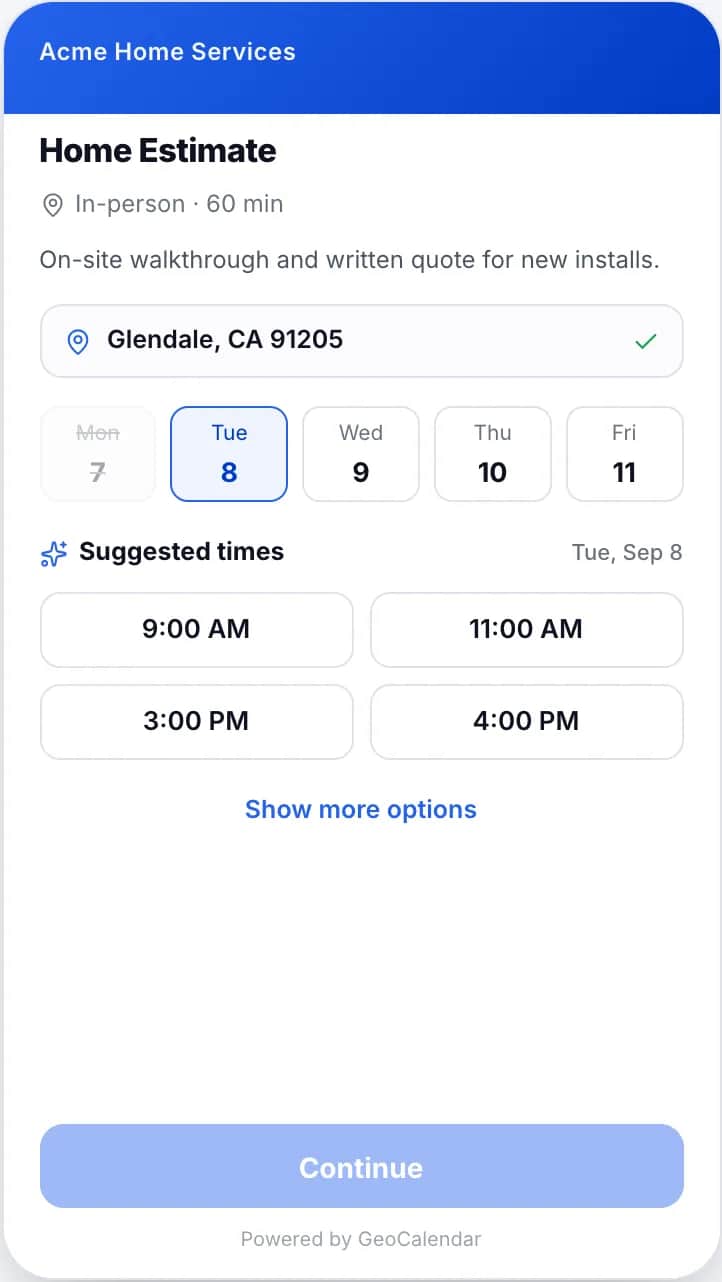
- A service area turns away addresses you would never drive to, before they book.
- The drive is blocked on your calendar as its own strip, so the next booking accounts for it.
- With several hosts, each time is offered for whoever could reach it with the least driving.
- A map shows the day as a route, in visiting order.
The limits: drive times are typical-traffic estimates and not live traffic, and the customer can still choose a time that was not suggested.
Using both
Plenty of businesses have both kinds of booking: sales calls and site visits. Nothing stops you keeping Cal.com for the calls and using GeoCalendar for the visits. Both read and write the same Google or Outlook calendar, so a booking made through one shows as busy time in the other.
Moving your in-person bookings
- Connect the Google or Outlook calendar you already use. What is on it blocks booking right away.
- Create one event type for each kind of visit, with its length.
- Set your home base, and the service area on each event type.
- Replace the link in your emails and the embed on your website.
Visits already on your calendar count toward the ranking as long as each one has an address in its location field. How suggested times are chosen covers the rest.
Common questions
Does Cal.com calculate travel time between appointments?
Cal.com offers a fixed buffer before or after each booking, up to 120 minutes. On November 11, 2026 its help center described no feature that works out the drive between two addresses.
Is Cal.com free?
For one user, yes: its pricing page lists a free plan. Its Teams plan was $12 per user a month, billed annually, on November 11, 2026. GeoCalendar has no free plan; it has a 14-day trial with no card.
Can I use Cal.com and GeoCalendar together?
Yes. Both sync with Google and Outlook calendars, so a booking made in one blocks that time in the other.
Sources
- Cal.com: Pricing
- Cal.com Help: Event buffers
- Cal.com: Buffers and booking limits
- Cal.com Help: How to add a location to your booking link
- Cal.com Help: Offer seats (on the attendee-address location)
- Cal.com Help: Calendars and conferencing
- Cal.com Help: Workflows
- Cal.com: App store
- Cal.com: Embed
This page is written by GeoCalendar. What it says about Cal.com comes from Cal.com’s own pricing page, help center and feature pages, read on November 11, 2026. If something here is out of date, tell us and we will correct it.
Cal.com is a trademark of its owner. GeoCalendar is not affiliated with Cal.com.