 GeoCalendar
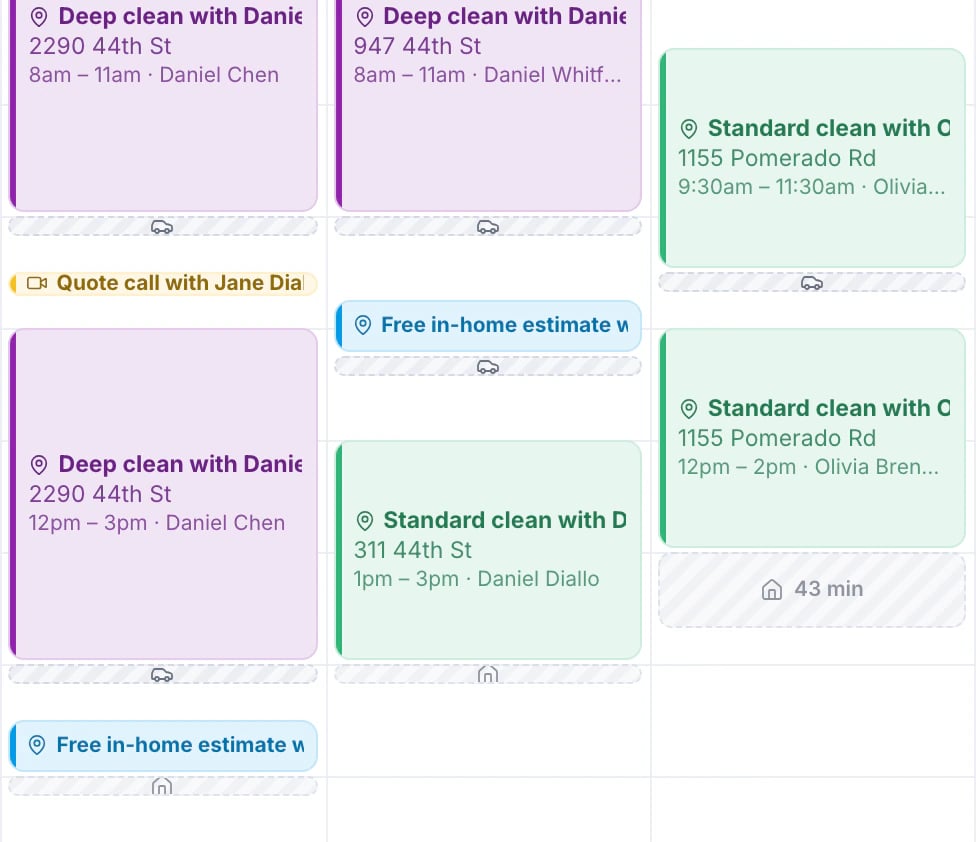
Between two in-person visits on the same day, the calendar shows a bar for the drive, from when you’d leave to when you’d arrive. The first and last bars of a day, with a house on them, are the drives from and back to your home base.
A bar with room for it shows its minutes, and one between visits its distance too. Hover over any bar to see where it goes from and to.
How it’s measured
Each drive is a typical driving time along real roads, without live traffic. When an address can’t be routed yet, the drive is guessed from the straight line between the two places and the bar has a dotted edge until it’s measured.
Drive bars show you the driving. They don’t block time on your calendar or on the booking page: Smart Suggestions does the planning around them, and buffers keep fixed time free. See Buffers before and after a visit.
When there are no drive bars
- You have no home base yet. See Set your home base and working hours.
- The visit is virtual, or its address couldn’t be found on the map. A visit with an address that couldn’t be found is flagged on the calendar; open it and correct the address.
- You’re looking at the whole team at once: the team view shows each person’s day, and the drives on it.
Updated November 10, 2026
Learn moreThe calendar